Administrators can now choose to synchronise all Outlook emails that have a corresponding email address on Ezekia. You can opt selected firm users out of this synchronisation process if necessary.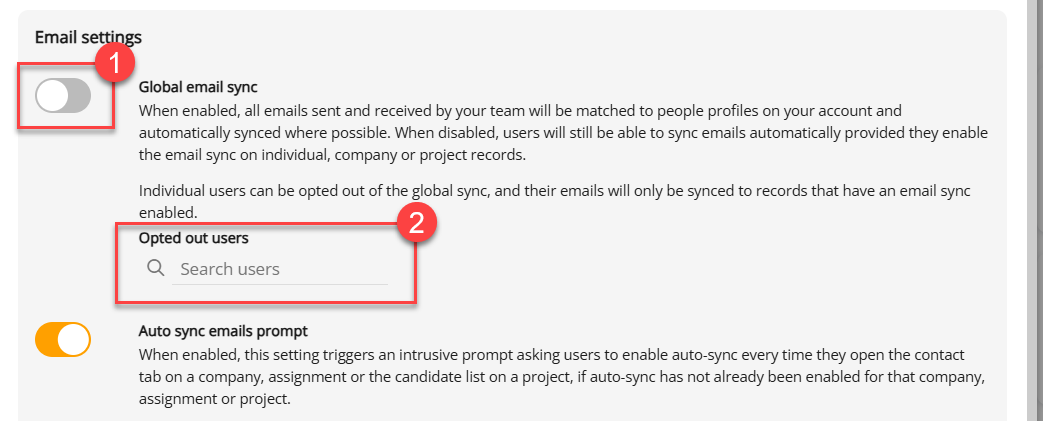
From the moment you turn it on, all emails received or sent by users on the system will synchronise. Emails received before the synchronisation process is activated will not synchronise using this process. Emails already present will remain on the profile, and you can synchronise historical emails on an individual person record basis.
Setup
As an administrator, navigate to Settings, Integrations, then click the Microsoft integration.
- Turn this setting on. All emails received or sent by users on the system will synchronise thereafter. Past emails will not be synchronised with this process, but any emails already present on people records will not be affected.
- You can opt selected users out of this process by selecting their name here.
Historical Emails
Once the synchronisation has been switched on, users can synchronise past emails in their Outlook (from before the synchronisation was switched on), on any profile on an individual basis.
Navigate to the person profile email page.
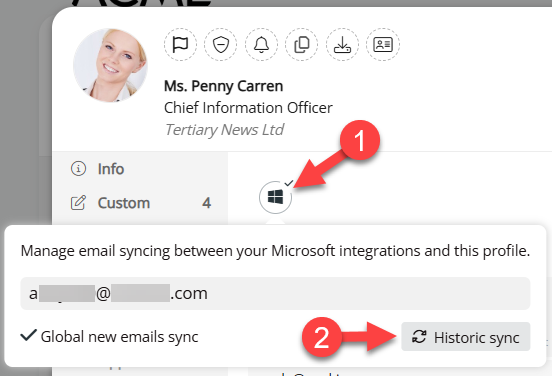
- Click the Windows Icon
- Click Historic sync to synchronise that person's older emails.
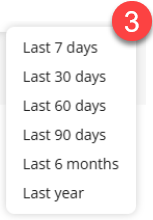
- You will have an option to select how far back you want emails to be replicated.
Exceptions
| Opted Out Users | These will not be included in the global sync, but they can still synchronise a profile's emails using the Microsoft icon on the email page. |
| Profiles appearing to belong to your search firm. | If the email address matches the domain used by the search firm (as recorded in the DKIM page), it will not be included in the global synchronisation. This is to prevent internal emails from being unintentionally stored on Ezekia profiles. Note that you can use this feature to deliberately prevent a person record from being Synchronised (if for example, their emails are always of a confidential nature) - simply add a secondary dummy email like 'nosync@your-email-domain.com' |
| Inactive Users | Emails on Inactive users will not be synchronised. |
| Inactive email addresses on user profiles | Email addresses that have been marked as 'Inactive' on the person record will not be synchronised. |
Was this article helpful?
That’s Great!
Thank you for your feedback
Sorry! We couldn't be helpful
Thank you for your feedback
Feedback sent
We appreciate your effort and will try to fix the article