The Ezekia AI Connector (MCP) lets approved AI tools work with your Ezekia data on behalf of a signed in user. Ezekia's own built-in AI features, Sidekick, AI Automations, AI Enrichment and Creation, and Query Builder analysis, work differently: they send data to OpenAI directly. This article answers the questions that come up in security reviews, vendor assessments and data protection questionnaires for both, covering how the connection is authenticated, which direction data travels, what is kept where, and how your existing Ezekia permissions apply. The two paths are separate, so check which one applies to you before relying on any answer below.
For setup instructions, see Connect External AI Tools to the Ezekia AI Server (Model Context Protocol - MCP).
Quick answers
Authentication: OAuth for AI clients that support it, or an Ezekia API token for clients that only support bearer tokens.
Direction of flow: requests travel from the AI client to the Ezekia MCP server to the Ezekia REST API. Data returns along the same path. Nothing is pushed from Ezekia to an AI client unprompted.
Retention in the MCP layer: none. The MCP server is pass through. It does not cache Ezekia data, write it to disk or retain request payloads. Retention in the built-in AI features: data is sent to OpenAI and stored in the OpenAI account connected to Ezekia. Individual responses are kept for OpenAI's standard 30 day period. Sidekick chat conversations and their vector stores are not covered by that period and remain until deleted.
Ezekia's built-in AI features and OpenAI
This section covers Sidekick, AI Automations, AI Enrichment and Creation, and Query Builder analysis. It does not apply to the MCP connector, where the model doing the reasoning belongs to whichever AI tool you have connected. These features use OpenAI's platform API, specifically the Responses API. They run on the OpenAI account whose API key is connected under Settings, AI, OpenAI Settings. Where a firm has connected its own OpenAI account, everything described below sits in that firm's own OpenAI organisation, under its own contract with OpenAI, and can be viewed and managed there.
What is stored, and for how long
Responses. Ezekia does not disable OpenAI's default response storage, so the request and the response are retained by OpenAI for its standard 30 day period and are visible in the logs of the connected OpenAI account.
Conversations. Each Sidekick chat is backed by an OpenAI Conversation, which is how chat history is kept and shown back to users. Conversations are not covered by the 30 day retention period. They remain until they are deleted.
Vector stores. Sidekick creates one vector store per chat thread, holding a structured representation of the relevant record data, and reuses it for the rest of that thread. Currently these do not expire and are not deleted automatically.
Documents. When Sidekick reads a document attached to a record, such as a CV, the text of that document is sent to your AI provider as part of the request, in the same way as other record data. Each time Sidekick opens a document, a ‘downloaded’ note is added to the record, the same as a manual download, so you can see which documents have been read and by whom.
What Ezekia retains. Nothing. Ezekia does not store prompts, responses or request payloads from these features. Your Ezekia database remains the system of record, under the retention rules that already apply to your account. See Data Retention in Ezekia: Roles, Responsibilities, and GDPR Compliance.
Processing regions. Requests are sent to OpenAI's standard global endpoint. Ezekia does not route requests by region.
Model training. OpenAI states that data submitted through its API services is not used to train its models. On an OpenAI business account you can also opt out of OpenAI learning from the data it is sent, and there is a link to do this on the OpenAI settings page in Ezekia. This is one of the reasons we recommend a business account rather than a personal one. See How do I set up and use OpenAI?
Access type: read and write, limited to the actions the authenticated user or token is already permitted to perform in Ezekia.
Permissions: enforced by the Ezekia REST API, using the same permission model as the web application. The connector cannot see or do anything the user cannot.
Authentication
There are two supported methods, and which one applies depends on the AI client.
OAuth. Used by AI clients that support OAuth, including Claude, ChatGPT and Mistral Le Chat. The user is sent to an Ezekia consent screen in their browser, signs in with their own Ezekia credentials, and Ezekia issues an access token to the client. No credentials are shared with Ezekia support or with the AI provider, and no API token is created. Permissions come directly from that user’s own Ezekia account.
API token. Used by AI clients and agent frameworks that only support bearer token authentication, such as OpenAI Agent Builder, Microsoft Copilot Studio and developer tools. The token is generated in Ezekia under Settings, Integrations, and its permissions are determined by the permission group it is assigned. See Generate an API Token for the Ezekia AI Connector (MCP).
Both methods authenticate against the same endpoint, and both are subject to the same permission enforcement described below. The practical difference is that an OAuth connection is tied to one named user, whereas a token can be used by anyone with access to the AI agent it is configured in. We recommend the minimum permissions required, and a dedicated service account, wherever a token is used.
Technical specification
This section is for engineers and security reviewers configuring the connection. Every value below is published by the server itself and can be confirmed at the discovery endpoints listed.
| Endpoint | URL | Purpose |
|---|---|---|
| Server | https://mcp.ezekia.com | The MCP endpoint your AI client connects to, over HTTP |
| Authorisation server metadata | https://mcp.ezekia.com/.well-known/oauth-authorization-server | OAuth discovery, published for clients to read automatically |
| Protected resource metadata | https://mcp.ezekia.com/.well-known/oauth-protected-resource | Identifies the resource and its authorisation server |
| Authorisation | https://mcp.ezekia.com/authorize | Where the user signs in and grants consent |
| Token | https://mcp.ezekia.com/token | Issues and refreshes access tokens |
| Client registration | https://mcp.ezekia.com/register | Registers the AI client automatically |
Client registration. Dynamic client registration is supported, so no pre-issued client ID or secret is needed. A compatible client registers itself when the connection is first made.
Grant types. authorization_code and refresh_token.
PKCE. S256.
Scopes. None are advertised. Access is not scope based. The access token resolves to an Ezekia user, and every call is permission filtered by the Ezekia REST API using the same permission model as the web application.
Token presentation. Bearer token in the Authorization header.
What the connector cannot do
The connector is read and write within the authenticated user's permissions. The following are not exposed at all, regardless of permissions:
- Deleting or archiving people, companies or projects
- Merging duplicate records
- Sending email
- Managing users or permissions
How data flows
The integration has two phases: an authorisation phase that happens once per session, and the request phase that happens on every tool call.
A. Authorisation, once per session
1. The user’s browser opens the Ezekia consent screen and authorises the connection.
2. The OAuth proxy passes the consent to Ezekia.
3. Ezekia issues an access token.
4. The access token is passed to the AI client.
B. Every tool call
5. The AI client sends the tool call together with the bearer token to the Ezekia MCP server.
6. The MCP server verifies the token and identifies the user with Ezekia.
7. The MCP server calls the Ezekia REST API using that user’s token.
8. The REST API runs a permission scoped query against the Ezekia database.
9. The REST API returns permission filtered JSON to the MCP server, which passes it back to the AI client, where it enters the model provider’s context.
Step 9 is the point at which data leaves Ezekia’s control. Everything up to that point is inside Ezekia’s own infrastructure and permission model. Which data reaches the model provider is therefore determined by the request the user makes and by what that user is permitted to see.
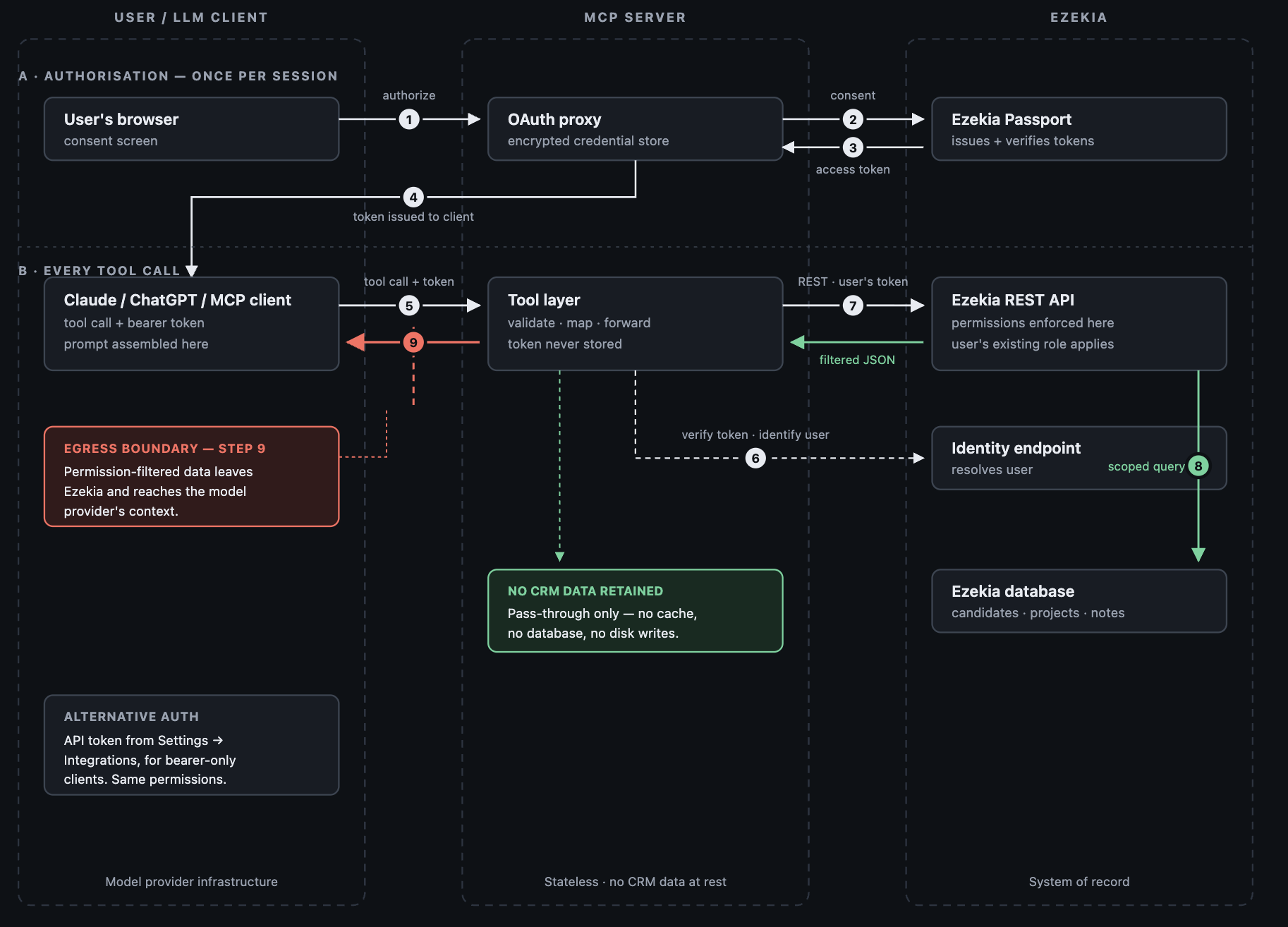
Direction of data flow
All traffic is initiated by the AI client. Ezekia does not push data to an AI client, does not send data on a schedule, and does not make outbound calls to a model provider of its own accord. Every piece of data that reaches an AI client is the response to a request that a named, authenticated user made in that session.
Traffic between all three parties is encrypted in transit using industry standard protocols.
Data retention in the MCP layer
The MCP server retains nothing. It collects data from the Ezekia API, processes it and passes it to the AI client. There is no cache, no database and no disk write in the MCP layer, and MCP request payloads are not retained. The Ezekia database remains the system of record, under the retention rules that already apply to your account. See Data Retention in Ezekia: Roles, Responsibilities, and GDPR Compliance.
Access tokens are held in an encrypted credential store for the life of the authorisation. They are not written into the tool layer.
Logging and audit
Currently, Ezekia does not keep a log of individual MCP requests, so the tool called, the parameters and the payload are not recorded and cannot be provided to a customer on request.
A full AI audit log is planned. It is intended to cover resources, prompts, tools called, payloads and responses, to meet EU AI Act requirements. It is not available today and no release date has been set. Please treat it as roadmap rather than current functionality.
Record history. Changes made through the connector run through the same application code as the web application, so they leave the same record history: what changed, the previous and new values, the user responsible and the time. The history doesn't currently show that a change came through MCP. Firm webhooks fire for these changes in the same way, so if you already send Ezekia events to a data warehouse or SIEM, connector activity arrives there too.
Deleting and undoing. The connector has no actions that delete people, companies, projects or notes, so the worst case is an unwanted edit rather than lost data. There is no bulk undo, but because the record history keeps the previous value, an unwanted change can be found and reversed by hand.
AI Automations. Automations use the same actions as the connector and run as a nominated user, with that user's permissions. A run makes at most 25 actions, one at a time, and nobody approves each change as it happens. Every run is logged with the triggering event, the instructions, the model, each action and its result, and the start and finish times. Admins can read these logs in Ezekia's AI settings.
Read only or read and write
The connector is read and write. It can search people, companies, projects and tasks, create and update records, add notes and tasks, and manage candidates and contacts within projects. It performs those actions as the authenticated user, so they appear in Ezekia exactly as if that user had made them in the web application.
If you need a read only connection, that is achieved through permissions rather than through a connector setting: connect using an API token assigned to a permission group that has no edit rights, or restrict the Ezekia user account being used.
The current list of supported actions is visible in your own account under Settings, Integrations, Ezekia AI Connector.
Approving changes. Every action is labelled for the AI client as read only, adding data, or changing existing data. ChatGPT and Claude use these labels to decide when to ask the user to approve an action before it runs. That approval setting sits in your ChatGPT or Claude administration, not in Ezekia, and we recommend leaving it switched on, especially while you are trialling the connector.
Limits. Connector traffic is rate limited separately from other API traffic, by default at 20 requests per second per user.
How your permissions model is respected
Permissions are enforced in the Ezekia REST API, not in the MCP server and not in the AI client. The connector has no permission model of its own. It can do exactly what the authenticated user can already do on the site, and nothing more.
For OAuth connections, that means the individual user’s own permissions. Two people sharing a ChatGPT or Claude workspace do not gain access to each other’s Ezekia data, because each must authorise with their own Ezekia account.
For token connections, that means the permissions of the group assigned to the token.
Restriction is applied at function level, which actions are available, and at record level, which records the user can reach. Field level restriction is not available: within a record the user is permitted to see, the connector can see the same fields that user sees in Ezekia. If a particular field must not be exposed to an AI client, restriction needs to be handled at record or permission group level instead.
Third party AI providers
Once data reaches the AI client at step 9, it is handled under the terms of the AI provider the customer has chosen, such as OpenAI, Anthropic, Google or Microsoft. Ezekia does not select that provider on your behalf, and customers retain full control over which AI services are connected. Each provider’s privacy policy and data processing terms apply to that portion of the flow. Where a customer uses Ezekia's own built-in AI features, a different set of answers applies. See Ezekia's built-in AI features and OpenAI above.
Information security standards
Ezekia maintains ISO 27001 certification and can provide supporting documentation on request.
Related articles
Connect External AI Tools to the Ezekia AI Server (Model Context Protocol - MCP)
Generate an API Token for the Ezekia AI Connector (MCP)
Data Retention in Ezekia: Roles, Responsibilities, and GDPR Compliance
If you need anything further for a security review, please contact support@ezekia.com.

Was this article helpful?
That’s Great!
Thank you for your feedback
Sorry! We couldn't be helpful
Thank you for your feedback
Feedback sent
We appreciate your effort and will try to fix the article