Your Ezekia administrators can create a new assignment status such as ‘Closed’ or ‘Completed’, and optionally a Pipeline tag for candidates such as ‘Placed’ or ‘Hired’. These can be applied when an assignment concludes, helping to keep data accessible and clearly marked as no longer active - while also making it easy to report and filter on.
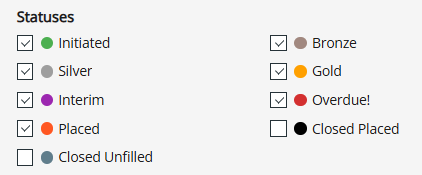
On the Assignments page filter panel you can show just the the assignments that are not closed like this:
After a suitable period (e.g. 12 months), you can archive the assignment. This hides it from view and excludes it from reports, but still allows retrieval if needed - acting as a soft delete. Later, if the assignment is no longer required at all, you can proceed to delete it entirely.
If you're unsure how to set up assignment statuses or pipeline tags, or if you'd like support managing your records, please contact support@ezekia.com
Was this article helpful?
That’s Great!
Thank you for your feedback
Sorry! We couldn't be helpful
Thank you for your feedback
Feedback sent
We appreciate your effort and will try to fix the article