This article applies to clients who access Client Portals provided by multiple search firms using the Ezekia platform.
Symptoms
A client may experience one or more of the following:
- Unable to log in to a Client Portal
- Repeated redirects during login
- Login page continually refreshing or returning to the login screen
- Access works for one firm's portal but not another
- Error messages relating to login or authentication
Cause
Client may access Client Portals from multiple search firms using the same email address. To ensure users are directed to the correct firm's portal, Ezekia associates the login session with the specific firm being accessed. If the browser does not have the correct firm information available, the user may be unable to log in successfully.
Resolution
Option 1 (Recommended)
Ask the client to access the portal using the most recent invitation or portal update email they received from your firm. These emails contain a direct link that will automatically direct the client to the correct portal and establish the required login context.
Option 2
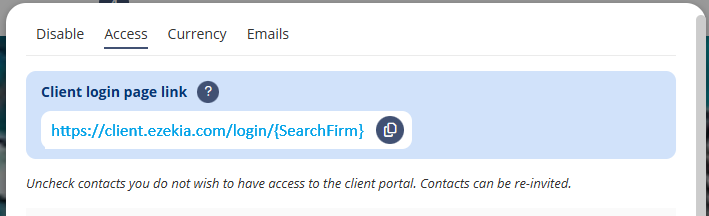
Ask the client to access your firm's dedicated portal login URL, which will look something like:
client.ezekia.com/login/{SearchFirm}
This URL will establish the required login context and direct the client to the correct portal. The URL can be found within the Access tab of any Client Portal (select Invite clients top right > Manage Invites), where it can be copied and shared directly with clients if required:
Some firms even choose to include their dedicated Client Portal login URL within their default Client Portal email template.
Additional Information
- Clients can access multiple firms' portals using the same email address.
- Clients do not need a different email address for each firm's portal. However, depending on how access has been configured, a client may have separate portal accounts for different firms (and their respective portal URLs), even when using the same email address. In these situations, different passwords may be used for each portal account.
- The first login on a new browser or device may require access via an invitation email or firm-specific login URL.
- Clients must allow browser cookies for the Client Portal to function correctly. If cookies are blocked, login and portal navigation may not work as expected.
- If a client clears their browser data or uses a different browser or device, they may need to repeat the resolution steps above.
- If a client has access to multiple assignments within the same firm's portal, they can switch between assignments from within the portal after logging in. For more information, see: Clients with Multiple Assignments in the Portal.
When to Contact Support
If the issue persists after following the steps above, please contact support@ezekia.com and provide:
- The client's email address
- The firm name
- A screenshot of any error message (if available)
- The URL being accessed
This will help us investigate and resolve the issue as quickly as possible.
Was this article helpful?
That’s Great!
Thank you for your feedback
Sorry! We couldn't be helpful
Thank you for your feedback
Feedback sent
We appreciate your effort and will try to fix the article