These reports should be run from the assignment candidate list (this ensures that the correct assignment is referenced in the report). From the assignment candidate list, open the profile you want to run the word report for.
Click the Download icon arrowed at the top of the profile.
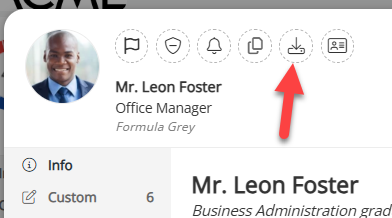
On the next popup, switch to the Word tab, select the report you want and click ‘Generate Report’ to run the report. The is option further down the same page to have the report be sent to the Download section of your broswer, have it written to the person's attachments tab, or have an email sent to you with which you can download the report.
Was this article helpful?
That’s Great!
Thank you for your feedback
Sorry! We couldn't be helpful
Thank you for your feedback
Feedback sent
We appreciate your effort and will try to fix the article